Detecting Spam with Agentforce
Learn how BigSolve uses Agentforce and Flow to automatically detect and filter out spam website leads, so your sales team only sees real prospects.

Automatically Filtering Spam Website Leads with Agentforce
Inbound website leads are a double-edged sword. On one hand, they’re a crucial part of your sales funnel. On the other, they can attract a flood of spam, bots, and low-quality submissions that eat up your sales team’s time.
At BigSolve, we recently tackled this exact challenge for a client, and came away with a robust, AI-powered solution that stops spam at the door, letting only legitimate leads flow to the sales team. Here’s how we did it (and how you can, too).
The Problem: Website Spam in the Sales Funnel
Anyone with a “Contact Us” or “Get a Quote” form knows the pain: not all website leads are created equal. It’s not uncommon for a significant percentage of inbound leads to be:
- Bots filling out forms with gibberish names and fake companies
- Competitors fishing for information
- Automated SEO spam
- Vendors pitching unrelated services
- Even just the “test” submissions that sneak in from internal or partner teams
Every one of these clogs your pipeline and wastes valuable sales hours.
The Solution: Agentforce + Flow = AI-Powered Spam Filtering
Our approach combines the flexibility of Salesforce Flow with the intelligence of Agentforce’s Large Language Models (LLMs).
Here’s the high-level architecture:
- When a Lead is created with “Website” as the Lead Source, a Flow is triggered.
- Agentforce LLM analyzes the Lead’s details (name, company, title, phone, description) and returns a simple verdict:
"Spam"or"Legitimate". - If “Spam” is detected, the Flow automatically updates the Lead Status to “Unqualified” and logs the reason as “Spam.”
- Legitimate leads pass through untouched. No human review required.
Why This Works
- No more wasted sales hours: your reps only see leads worth pursuing.
- No manual review queues: the system acts in real time, 24/7.
- Tunable & explainable: you control the Flow logic, and can review “Spam” leads if needed.
- Easily extensible: expand the logic to handle new spam patterns, or apply it to other objects (Cases, Contacts, etc.).
How We Built It (Technical Deep-Dive)
1. Prompt Template:
We designed a prompt for Agentforce with this specific task:
🧑 Role: You are a spam detection assistant for {!$Organization.Name}, responsible for reviewing Leads and identifying spam submissions before they reach the sales team.

Lead Details:
• {!$RecordSnapshot:Lead.Snapshot}

---

📌 Instructions: Review the details above and determine if this Lead is likely spam or legitimate.
• Spam leads often have gibberish or obviously fake names, nonsense or advertising in the Message, missing or dummy data, or other patterns typical of bots or bad actors.
• If you are unsure, err on the side of “Legitimate” (do not be overly strict).

---

⚠️ Constraints & Formatting:
• Respond with only one word:
 - “Spam” if the Lead is likely spam
 - “Legitimate” if the Lead is likely legitimate
• Do not include any other words, commentary, or formatting.
• If there is not enough information to decide, respond with “Legitimate”.

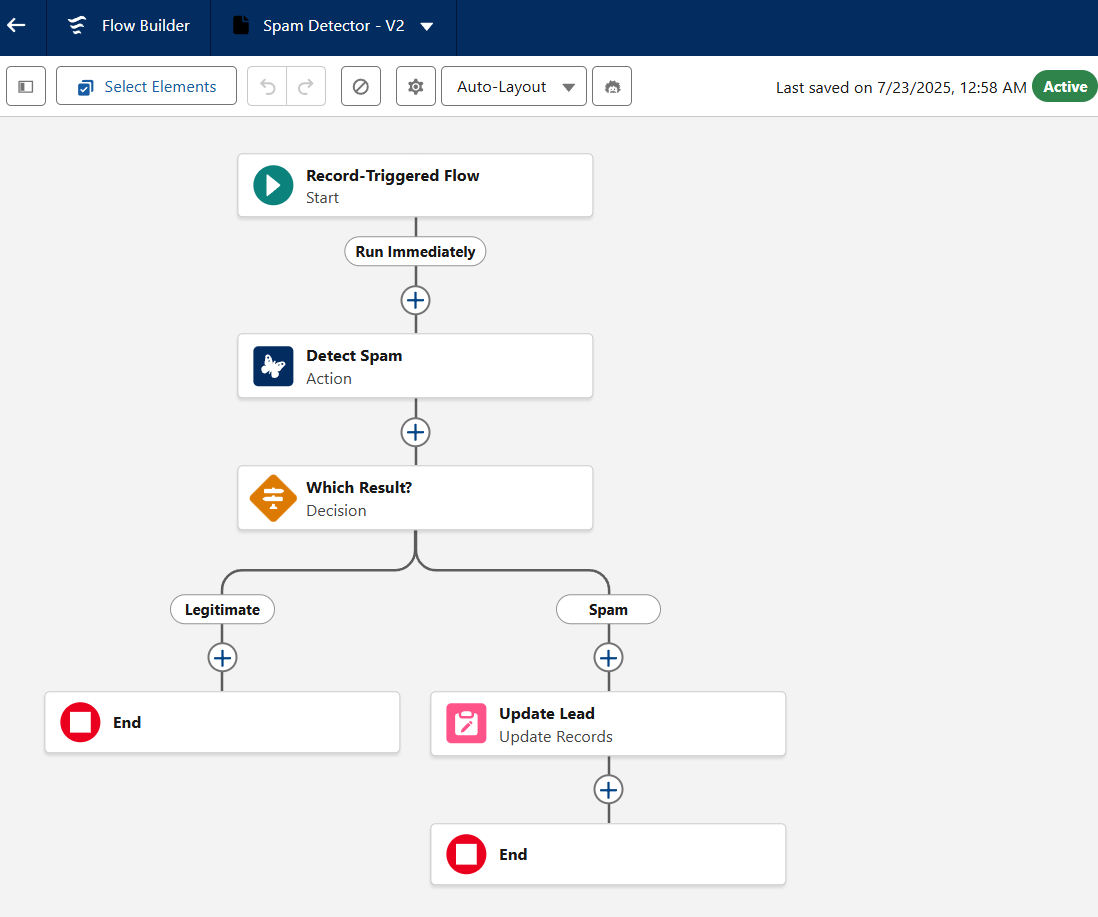
2. Record-Triggered Flow:
- Trigger: When a new Website Lead is created
- Agentforce Action: Pass the Lead to the “Detect Spam” prompt
- Decision Element:
- If the response is
"Spam", set Status =Unqualifiedand Reason =Spam - If
"Legitimate", do nothing
- If the response is
- Update Lead: Automatically update the Lead’s Status and Unqualified Reason if it’s spam. No manual work needed.
Results & Business Value
What happened after launch?
- Spam submissions dropped out of the sales team’s view instantly
- The team’s “first call response time” to real prospects improved noticeably
- No more wasted cycles chasing obviously fake or junk leads


Get Started with an Expert-Led Discovery