Connect Claude to Your Salesforce Org with MCP
Connecting Claude to Salesforce takes about ten minutes. Knowing which MCP server to use, and how to scope it so an LLM never touches the wrong org, is what separates a toy from something you'd run on a client org.
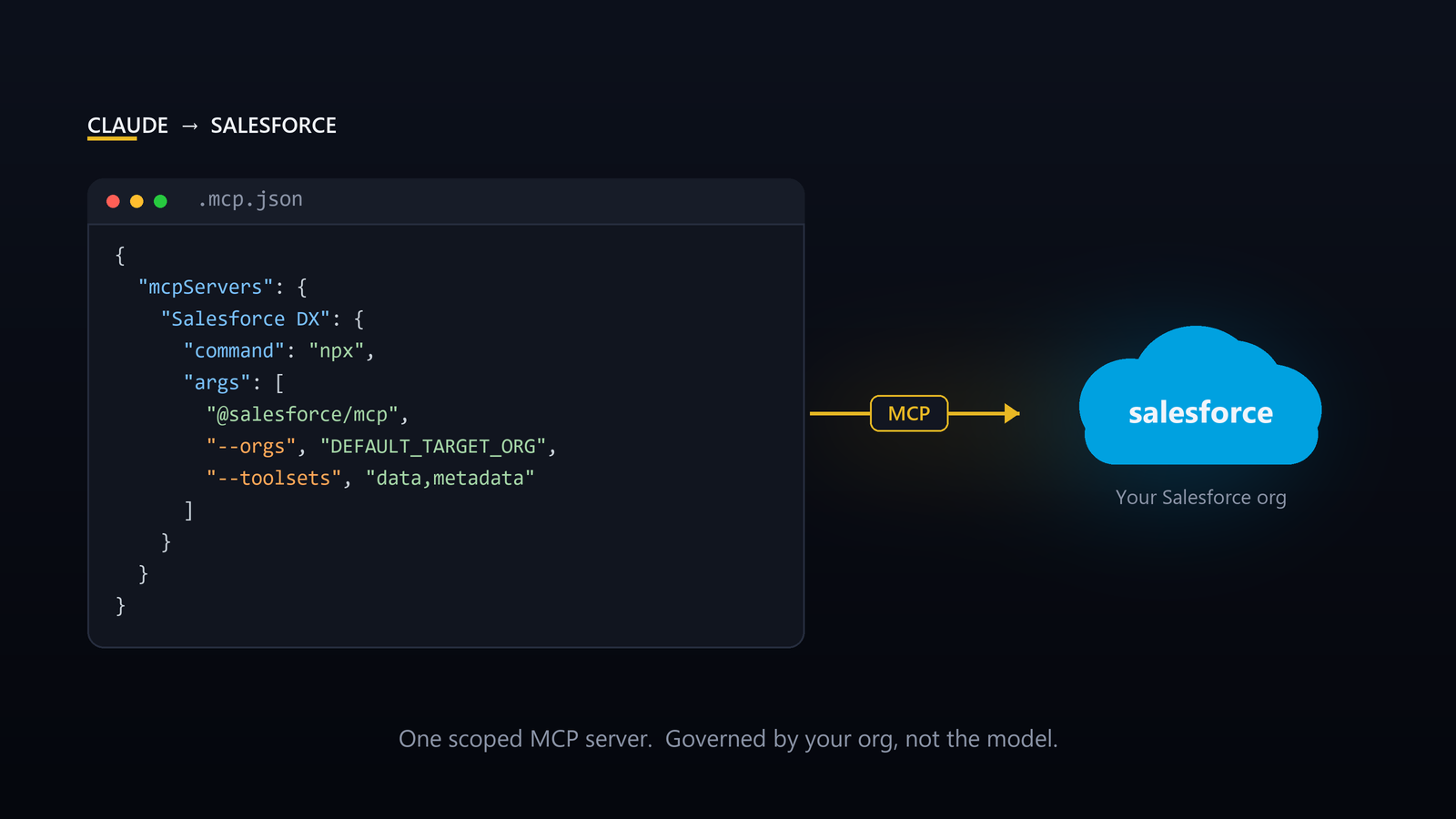
Most "AI in Salesforce" content stops at the demo. Someone types a question, an agent answers, everyone claps. Nobody shows you the wiring, or the part where you decide whether to point a language model at your production org.
The wiring is the easy part. It takes about ten minutes. The judgment is the part that separates a toy from something you'd actually run on a client org.
Here's how to connect Claude to Salesforce through MCP, which of the two options to use, and how to do it without handing an LLM the keys to your entire instance.
What MCP actually is
Model Context Protocol is the standard that lets an AI client (Claude Code, Claude Desktop, Cursor) talk to an external system through a defined set of tools. No screen scraping, no brittle browser automation. The model calls a tool, the tool runs against your org, structured data comes back.
For Salesforce there are now two ways to do this, and they solve different problems. Pick the wrong one and you'll either over-engineer a dev task or under-secure a production one.
The local DX MCP server (@salesforce/mcp) runs on your machine and is built for development. It exposes 60+ tools across more than a dozen toolsets: SOQL queries, metadata retrieve/deploy, Apex test runs, code analysis, and DevOps Center pipelines. It authenticates through the Salesforce CLI you already have, so there's no connected app to stand up.
The Salesforce Hosted MCP Servers run in the platform and are built for runtime. They let an agent execute business logic and query data across the Agentforce 360 Platform, Data 360 SQL, and Tableau Next without ever logging into Lightning. This is the path for agent operations and custom tools built from your Flows, Apex Actions, and Named Query APIs. This path requires real OAuth.
Short version: if you're building and shipping metadata, use the local server. If you're running an agent or assistant against live business processes, use hosted for the per-user OAuth and platform governance.
The setup that gets you working in ten minutes
Start with the local DX server. You need Node.js and the Salesforce CLI installed.
First, authorize the org. The CLI ships with its own registered connected app, so this is one command, no setup-menu detour:
sf org login web --alias my-dev-org
Then add the server to your project. Drop a .mcp.json in the project root:
{
  "mcpServers": {
    "Salesforce DX": {
      "command": "npx",
      "args": ["-y", "@salesforce/mcp",
        "--orgs", "DEFAULT_TARGET_ORG",
        "--toolsets", "orgs,metadata,data,users",
        "--tools", "run_apex_test",
        "--allow-non-ga-tools"]
    }
  }
}
Restart Claude Code, and it can now query, deploy, and test against that org. That's the whole tutorial. Everything past this point is judgment, not steps.
The two flags that matter most
Notice what's in that config, and what isn't.
--orgs takes a specific org, not every org you've ever authorized. There is an ALLOW_ALL_ORGS value. Don't use it. The moment you do, one careless prompt can run against the wrong instance, and "the wrong instance" is sometimes production. Scope the server to exactly the org you're working in, and if you juggle multiple clients, run a separate config per project. Isolation isn't paranoia. It's the difference between a controlled tool and an incident.
--toolsets is your blast radius. The default config above grants data, metadata, users, and orgs. Hand out only what the task needs. If you're reviewing code, you don't need write access to user records. If you're running SOQL, you don't need the deploy toolset live. Narrow the surface and you narrow what can go wrong: the same principle you'd apply to a permission set, applied to an AI client.
Concretely: if all Claude is doing is reviewing Apex and inspecting metadata, scope it down to one toolset and leave data out entirely.
"args": ["-y", "@salesforce/mcp",
        "--orgs", "DEFAULT_TARGET_ORG",
        "--toolsets", "metadata"]
This is the part the demos skip. Connecting Claude is trivial. Connecting it with the right org scoped and the right toolsets enabled is the part that holds up on a real engagement.
When you graduate to hosted
The hosted servers — GA for Enterprise Edition orgs and above as of April 2026 — are a bigger commitment, and worth it when you've moved from "help me build" to "let an agent operate."
Setup runs three steps:
- Enable the servers. In Setup, search MCP Servers under API Catalog, open the Salesforce Servers tab, activate the servers you want, and note each API name and server URL.
- Create an External Client App. Enable PKCE and JWT-based access tokens, set the callback URL for your client (
http://localhost:38000/callbackfor Claude Code,https://claude.ai/api/mcp/auth_callbackfor Claude Desktop), and grab the consumer key and secret. - Register the server with Claude using that URL and key, then authenticate.
One wiring detail that trips people up: point the client at the server URL itself, https://api.salesforce.com/platform/mcp/v1/<server> (sandboxes insert /sandbox/), not your My Domain, which only shows up during the login redirect. And settle the client type up front. If the app requires a consumer secret, the browser login succeeds but the connection dies silently at token exchange unless that secret is also stored in the client. So for a CLI like Claude Code, make it a public client (PKCE only, secret optional) and there's nothing to mishandle.
The difference that matters here is identity. Hosted MCP runs as the authenticated user, so the existing permissions, sharing rules, CRUD/FLS, and audit trail all still apply. The same governance that protects every other entry point to the org protects the agent.
The payoff is custom servers: expose your own Flows, Apex Actions, and Named Query APIs as tools, so the agent operates through governed business logic instead of raw record access. That's how you give an agent real capability without giving it raw write access to every object. The controls live in the platform, where they belong.
The point most people miss
Connecting an LLM to Salesforce is no longer the hard problem. Salesforce solved it. The hard problem is the same one it has always been: scope, governance, and knowing which tool fits which job.
A dev who scopes the server to one org and the minimum toolsets gets a genuinely faster build loop. A team that flips on ALLOW_ALL_ORGS and points it at production "to see what happens" gets a cautionary tale. Same protocol, opposite outcomes. The difference is architecture, not the AI.
That's the part we think about before we wire anything up. If you want help connecting Claude to your org the right way (scoped, governed, and actually safe to run), 👉 Let's Chat.
Frequently asked questions
Can Claude connect to Salesforce?
Yes. Through MCP, Claude can run SOQL, retrieve and deploy metadata, run Apex tests, and operate against your org. There are two paths: the local Salesforce DX MCP server for development, and Salesforce Hosted MCP Servers for runtime agents.
What's the difference between the Salesforce DX MCP server and Salesforce Hosted MCP Servers?
The DX server runs on your machine, authenticates through the Salesforce CLI, and is built for development. Hosted servers run inside the platform under per-user OAuth and are built for agents executing governed business logic at runtime. Build with local; run agents with hosted.
Should I connect Claude to a production org?
Only deliberately. Scope the server to that one org (never ALLOW_ALL_ORGS), grant the minimum toolsets, and prefer hosted MCP, which runs under the user's existing permissions and audit trail, for anything operating on live business data.
Is Salesforce MCP safe?
It's exactly as safe as how you scope it. The risk isn't the protocol; it's an over-permissioned config pointed at the wrong org. Limit --orgs to one instance and --toolsets to the task, and hosted MCP additionally enforces CRUD, FLS, and sharing.
Does Salesforce MCP require a Connected App or External Client App?
The local DX server doesn't. It uses the CLI's own registered connected app. Hosted servers do: you create an External Client App with PKCE and JWT-based access tokens.

Get Started with an Expert-Led Discovery